Introducing Claude Design by Anthropic Labs
Claude Design is a new Anthropic Labs product that lets you collaborate with Claude to create polished visual work like prototypes, slides, one-pagers, and more.
This lesson is original educational writing based on this video by Anthropic (published April 17, 2026). All credit for the original content goes to the creators.
1. What Claude Design is — and what makes it different
There has always been a gap between Claude’s ability to reason about design and its ability to produce polished visual work. In a standard chat interface, Claude can describe a presentation structure, suggest layout ideas, or write the content for a slide deck — but producing the actual visual artifact, something you could hand to a stakeholder or publish on a website, has required taking Claude’s text output and doing the design work yourself in Figma, PowerPoint, or another tool.
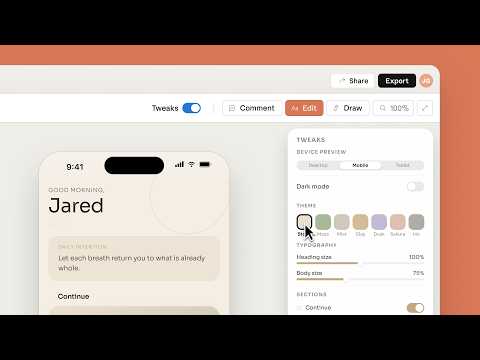
Claude Design closes that gap. It is a product from Anthropic Labs — Anthropic’s experimental product group — designed specifically for collaborative visual creation. The interface is built around the visual artifact rather than the conversation: you describe what you want, Claude produces a rendered version, and you iterate together until it is right. The conversation is in service of the visual output, not the other way around.
The “Labs” framing matters. Anthropic Labs is where Anthropic ships experimental products that are more speculative and faster-moving than the core Claude products. Claude Design launched in April 2026 as a product in this experimental category — meaning it is real and usable, but also actively evolving based on user feedback. Features may change, the design of the product itself may shift, and Anthropic is explicitly treating it as a learning exercise about what visual collaboration with AI should feel like.
2. What Claude Design can produce
Prototypes are interactive UI mockups — the kind of thing you would normally build in Figma or a quick React scaffold to communicate a product idea. With Claude Design, you describe the interface you have in mind (“a settings page for a mobile app with notification preferences and account management sections”), and Claude renders a visual prototype that you can see, react to, and iterate on. The prototype is not a real running application, but it is a polished visual representation that communicates the design intent clearly enough to share with stakeholders or use as a reference for development.
Slides are perhaps the most immediately accessible output for users who are not designers. Presentation decks are universally needed across every organization, universally time-consuming to produce, and universally terrible when done quickly in plain PowerPoint without design attention. Claude Design approaches slide creation as a collaborative visual task: you provide the content or a rough outline, Claude produces a designed deck, and you refine it through natural conversation. The result is slides that look like a designer made them — because the AI was thinking visually, not just generating bullet points.
One-pagers are the workhorse of business communication — the single-page document that needs to communicate a product, a project, or a proposal clearly and concisely to someone who will give it thirty seconds of attention. Claude Design handles the full task: figuring out what information should be included, how it should be structured visually, and what visual hierarchy will make the key message land. For non-designers, this is the difference between a wall of text and a document that actually gets read.
Visual documents more broadly — reports, research briefs, structured reference documents — round out the output types. Anything that benefits from thoughtful visual structure and layout rather than plain prose falls into this category.
3. The collaborative workflow
The workflow starts with description. You do not need a detailed brief or design spec — a high-level description of what you need (“a pitch deck for a B2B SaaS product targeting HR teams, emphasizing time-saving and integration with existing tools”) is enough to get a useful first version. Claude interprets the description, makes visual design decisions, and renders a complete first draft.
From there, iteration is conversational. You can say things like “make the header more prominent,” “add a section about pricing,” “change the color scheme to something more corporate,” or “the second slide is too text-heavy — can you make it more visual?” Claude understands these natural-language design instructions and modifies the rendered output accordingly. You are not clicking through menus or manipulating design tools; you are having a conversation about a visual artifact that both you and Claude can see.
This workflow is particularly powerful for people who know what they want visually but lack the technical skills in design tools to produce it. A product manager who can articulate “this needs to feel premium and technical, with a dark background and clear data visualizations” but cannot execute that in Figma has historically had to either hire a designer or produce something that looks amateurish. Claude Design changes that calculus: the articulation of what you want is sufficient to produce a polished result.
4. Who Claude Design is for
The most important thing to understand about Claude Design’s intended audience is that it includes — and is perhaps primarily targeted at — people who are not designers. Professional designers have sophisticated tools, established workflows, and deep visual intuitions; they may find Claude Design useful for rapid prototyping but are unlikely to use it as their primary design environment.
The larger opportunity is the vast majority of people who need polished visual outputs regularly but are not designers: product managers, marketers, analysts, founders, consultants, researchers, and anyone else who has ever needed to present work in a visual format and wished they had a designer on call. These users know their content; they just need the design execution.
For individual contributors in these roles, Claude Design offers something genuinely new: the ability to produce design-quality outputs without design skills or design tool proficiency. This matters because the gap between “good enough” and “polished” in visual communication is surprisingly large. A one-pager that looks designed gets read; one that looks like a formatted Word document often does not, regardless of content quality.
Check your understanding
4 questions · your answers are saved in this browser only
-
1. What is the core difference between using Claude in a standard chat interface and using Claude Design for visual work?
-
2. Which of the following is the best description of the Claude Design workflow?
-
3. What does the 'Anthropic Labs' label on Claude Design signify?
-
4. Who is the primary intended audience for Claude Design?
Build it yourself
Follow these exact steps to reproduce it yourself
- Access Claude Design — Claude Design launched as an Anthropic Labs product in April 2026. Check labs.anthropic.com for current access and any waitlist information.
- Choose your output type — Decide whether you need a prototype, slides, one-pager, or another visual document. Being clear about the output type upfront helps Claude make appropriate visual design decisions.
- Write a context-rich first prompt — Include: what the artifact is for, who the audience is, what key message or information it needs to convey, and any constraints (length, tone, brand guidelines if any). Richer context produces better first drafts.
- Evaluate the first draft visually — Look at the overall structure, visual hierarchy, and whether the key message reads clearly. Do not get distracted by details on the first pass — assess whether the overall approach is right.
- Iterate with specific feedback — Give Claude specific, actionable feedback: “the title section needs more visual weight,” “this slide has too much text,” “add a section about competitive differentiation.” Vague feedback like “make it better” produces less useful revisions.
- Focus on structure before style — Get the content structure and information hierarchy right before worrying about colors and visual polish. It is easier to adjust style after structure is solid than the reverse.
- Export and use — Once you are satisfied, export the artifact in the appropriate format for your use case (PDF for sharing, HTML for web embedding, etc.).